

缘之空安卓版汉化
1435MB · 2025-12-24

首先我们需要了解MCP是什么?需要了解大模型LLM是什么?通过LLM能计算数学表达式嘛?例如: 3+4的结果吗?
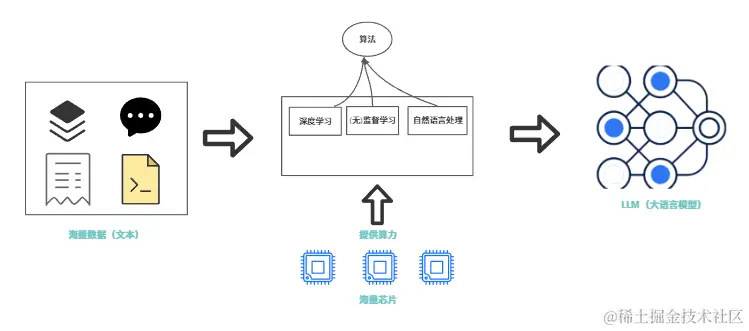
官网解释大模型LLM (Large Language Model)中文名为大语言模型或大型语言型,是一种相较传统语言模型参数量更多、在更大规模语料上进行预训练的语言模型(产物)。所以LLM的特点:海量的数据、预训练的产物(数据缺乏实时性)、文本数据(缺少真逻辑);所以后续相继出现了很多补充LLM大模型的工具和技术,例如:Function Calling 、 MCP 、 AI Agent等概览。
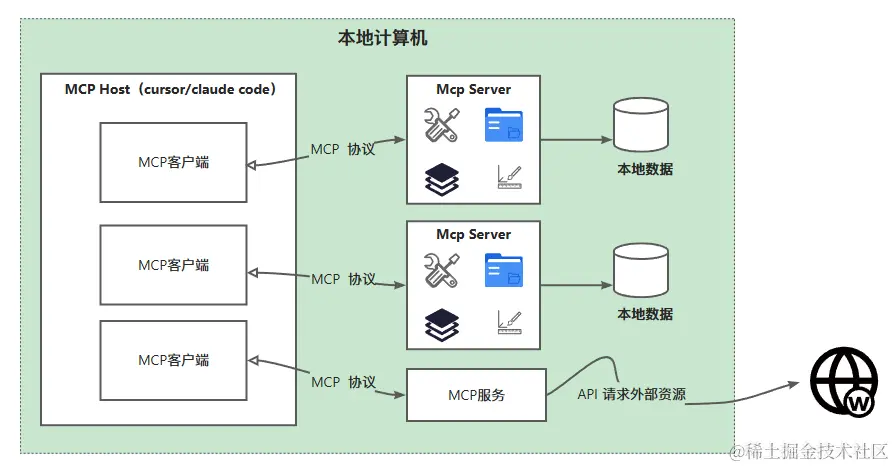
官网解释MCP(Model Context Protocol) 是一个开放协议,它为应用程序向 LLM 提供上下文的方式进行了标准化。你可以将 MCP 想象成 AI 应用程序的USB-C接口。USB-C : 为设备连接各种外设和配件提供了标准化的方式一样,MCP 为 AI 模型连接各种数据源和工具提供了标准化的接口安全,可以做到即插即用。
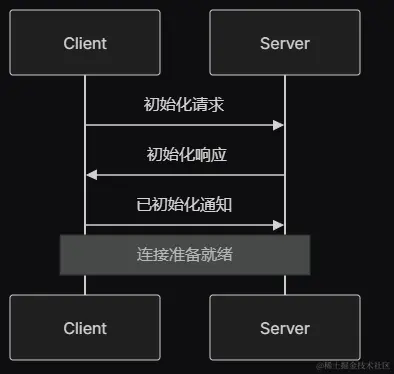
initialize 请求initialized 通知作为确认LLM不能完成的能力通过FastMcp快速创建 MCP Server服务,具体示例代码如下:
import axios from "axios";
import * as cheerio from 'cheerio';
import { FastMCP } from "fastmcp";
import { z } from "zod";

// 创建FastMCP服务器实例
const mcp = new FastMCP({
  name: "示例MCP服务器",
  version: "1.0.0",
  logger: {
    debug: (...args) => console.error('[DEBUG]', ...args),
    info: (...args) => console.error('[INFO]', ...args),
    warn: (...args) => console.error('[WARN]', ...args),
    error: (...args) => console.error('[ERROR]', ...args),
    log: (...args) => console.error('[LOG]', ...args)
  }
});
通过addTools快速完成添加工具,例如实现一个通过MCP获取任意网页的内容,将我们远程网页的内容喂给LLM大模型,让大模型可以为我们做更多事情,具有上网能力。具体示例代码如下:
const get_article = async (link: string) => {
  try {
    console.log(`Fetching web content: ${link}`);

    // 发送HTTP请求获取网页内容
    const response = await axios.get(link, {
      timeout: 10000, // 10秒超时
      headers: {
        'User-Agent': 'Mozilla/5.0 (Windows NT 10.0; Win64; x64) AppleWebKit/537.36 (KHTML, like Gecko) Chrome/91.0.4472.124 Safari/537.36'
      }
    });

    // 使用cheerio解析HTML
    const $ = cheerio.load(response.data);

    // 移除不需要的标签
    $('script, style, nav, header, footer, aside, .advertisement, .ads').remove();

    // 尝试提取主要内容
    let content = '';

    // 常见的文章内容选择器
    const contentSelectors = [
      'article',
      '.article-content',
      '.post-content',
      '.entry-content',
      '.content',
      'main',
      '.main-content',
      '[role="main"]'
    ];

    for (const selector of contentSelectors) {
      const element = $(selector);
      if (element.length > 0) {
        content = element.text().trim();
        if (content.length > 100) { // 如果内容足够长,就使用它
          break;
        }
      }
    }

    // 如果没有找到特定的内容区域,使用body
    if (!content || content.length < 100) {
      content = $('body').text().trim();
    }

    // 清理文本内容
    content = content
      .replace(/s+/g, ' ') // 将多个空白字符替换为单个空格
      .replace(/ns*n/g, 'n') // 移除多余的空行
      .trim();

    // 限制内容长度(避免过长)
    if (content.length > 5000) {
      content = content.substring(0, 5000) + '...';
    }

    console.log(`Successfully fetched content, length: ${content.length} characters`);
    return content;
  } catch (error) {
    console.error(`Failed to fetch web content: ${error instanceof Error ? error.message : String(error)}`);
    return `Failed to fetch web content: ${error instanceof Error ? error.message : String(error)}`;
  }
}
mcp.addTool({
  name: "get_article_by_link",
  description: "获取网页内容",
  parameters: z.object({
    expression: z.string().describe("要获取的网页内容")
  }),
  execute: async ({ expression }) => {
    try {
      console.log(`Fetching web content: ${expression}`);
      const result = await get_article(expression); // 注意:这里需要await
      return {
        content: [
          {
            type: "text",
            text: `Web content from ${expression}:nn${result}`
          }
        ]
      };
    } catch (error) {
      return {
        content: [
          {
            type: "text",
            text: `Error fetching web content: ${error instanceof Error ? error.message : 'Unknown error'}`
          }
        ],
        isError: true
      };
    }
  }
});

// 添加计算工具
mcp.addTool({
  name: "calculate",
  description: "执行数学计算",
  parameters: z.object({
    expression: z.string().describe("要计算的数学表达式")
  }),
  execute: async ({ expression }) => {
    try {
      // 简单的数学计算(仅支持基本运算)
      const result = eval(expression);
      return {
        content: [
          {
            type: "text",
            text: `计算结果: ${expression} = ${result}`
          }
        ]
      };
    } catch (error) {
      return {
        content: [
          {
            type: "text",
            text: `计算错误: ${error instanceof Error ? error.message : '未知错误'}`
          }
        ],
        isError: true
      };
    }
  }
});
通过addResource快速完成添加资源等能力,例如实现获取系统信息或让 LLM可以读取本地文件,将本地文件喂给 LLM大模型,让大模型具有本地文件推断能力。具体示例代码如下:
// 添加系统信息资源
mcp.addResource({
  uri: "system://info",
  name: "系统信息",
  description: "当前系统的信息",
  mimeType: "application/json",
  load: async () => {
    const os = await import('os');
    return {
      uri: "system://info",
      mimeType: "application/json",
      text: JSON.stringify({
        platform: os.platform(),
        arch: os.arch(),
        nodeVersion: process.version,
        uptime: os.uptime(),
        totalMemory: os.totalmem(),
        freeMemory: os.freemem(),
        cpus: os.cpus().length
      }, null, 2)
    };
  }
});
通过addPrompt快速完成定义大模型Prompt的能力,让 LLM可以选择 MCP提供的Prompt角色切换。具体示例代码如下:
// 修复后的prompt定义
mcp.addPrompt({
  name: "analyze-code",
  description: "分析代码以获得潜在改进",
  arguments: [
    {
      name: "language",
      description: "编程语言",
      required: true
    },
    {
      name: "code",
      description: "要分析的代码",
      required: true
    }
  ],
  load: async ({ language, code }) => {
    // 返回prompt内容,不是prompt对象
    return {
      messages: [
        {
          role: "user",
          content: {
            type: "text",
            text: `请分析以下${language}代码,并提供改进建议:nn```${language}n${code}n```nn请从以下几个方面分析:n1. 代码质量和可读性n2. 性能优化建议n3. 最佳实践建议n4. 潜在的安全问题n5. 代码结构改进建议`
          }
        }
      ]
    };
  }
});
MCP Inspector是一个交互式开发者工具,用于测试和调试 MCP 服务器。
npx @modelcontextprotocol/inspector  <command> <arg1> <arg2>

// 案例
npx -y @modelcontextprotocol/inspector npx server-postgres postgres://127.0.0.1/testdb
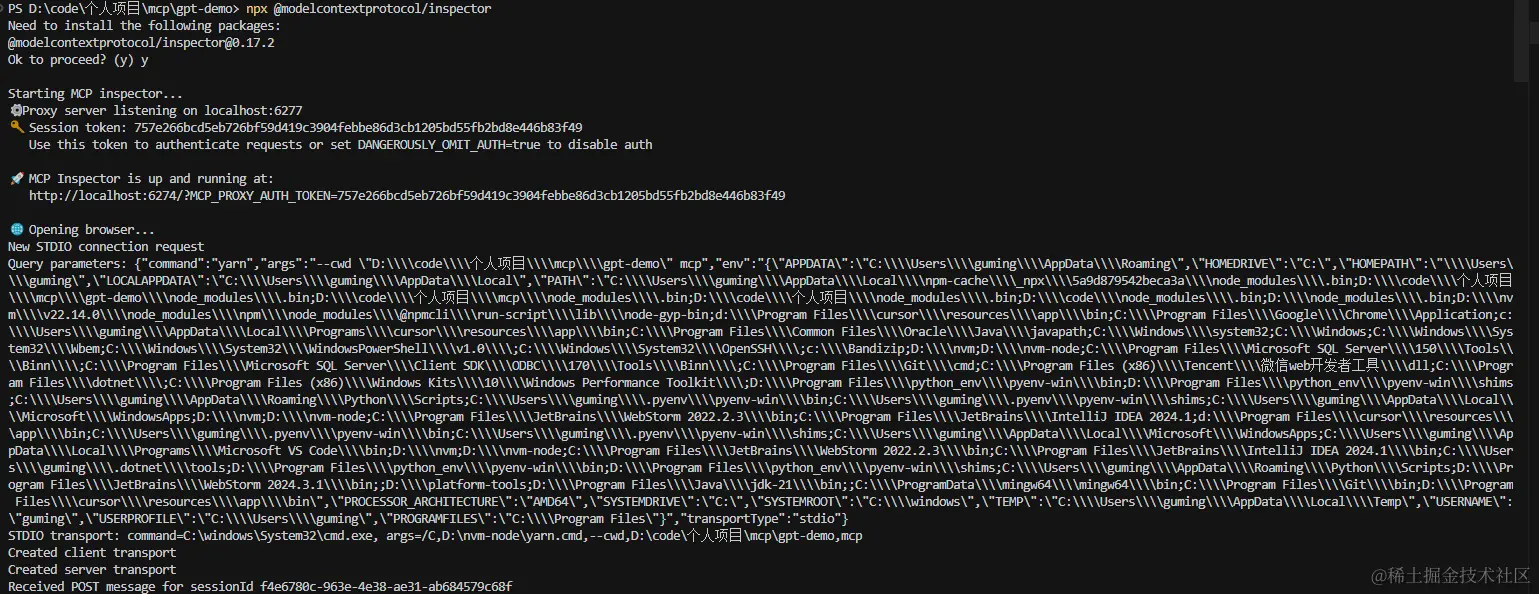
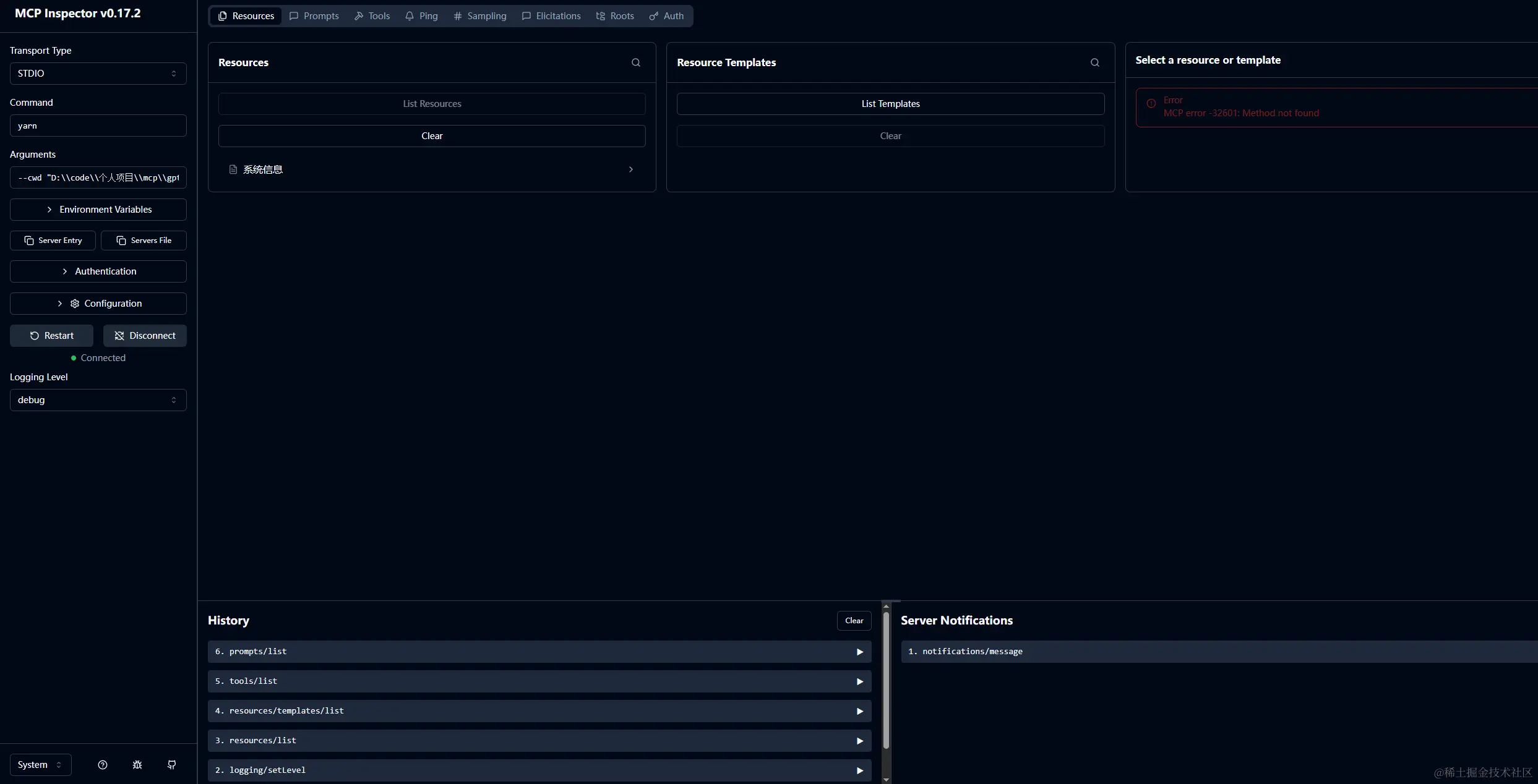
运行启动后,会在那浏览器打开一个本地服务连接http://localhost:6274/,如下图:
http://localhost:6274/本地服务的页面,可以通过 页面 common 和 args配置启动服务的命令。例如
yarn --cwd "D:\code\个人项目\mcp\gpt-demo" mcp 指定目录下执行 yarn mcp 启动服务
在Claude Desktop、IDE、Cursor等开发者工具中配置类似的服务,也可以完成MCP服务的集成。具体配置实例如下:
const mcpConfig = new MCPConfiguration({
  servers: {
    deepWiki: {
      type: "sse",
      url: "https://mcp.deepwiki.com/sse",
      timeout: 25000,
    },
    "mcp-test": {
      "type": "stdio",
      "command": "yarn",
      "args": [
        "--cwd",
        "D:\code\个人项目\mcp\gpt-demo",
        "mcp"
      ]
    }
});
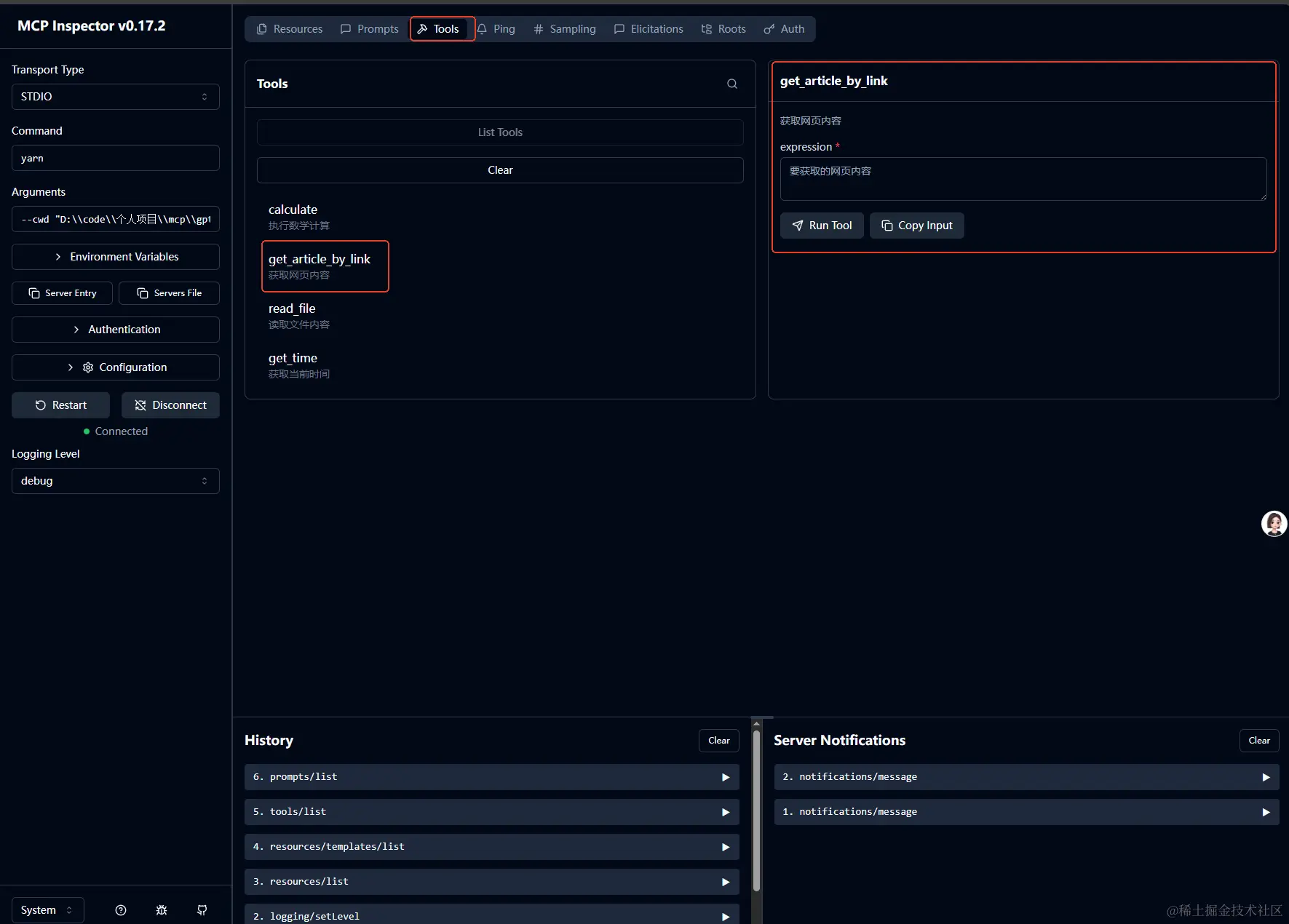
通过切换tab到tools可以看到我们开发的 tools 工具函数,选择对应调试的函数进行调试:
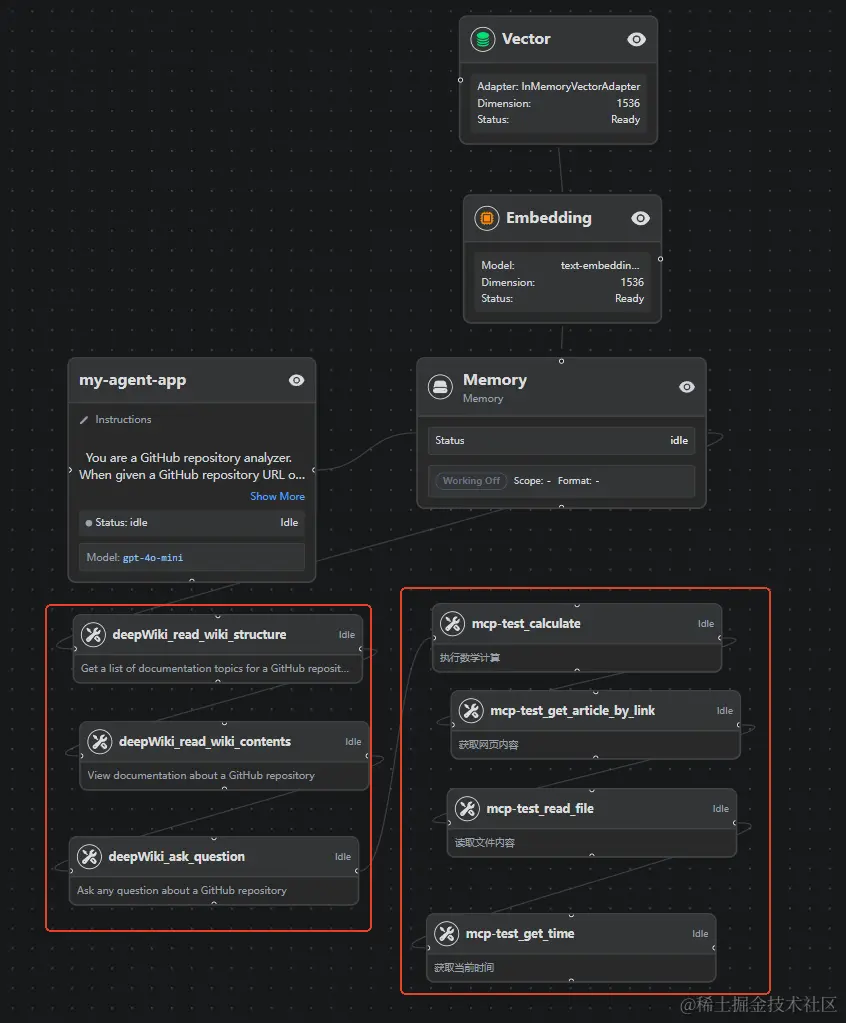
通过上面的配置看我们 MCP服务在 Claude Desktop、IDE、Cursor这些开发者工具中Agent 价值配置后结构,如下图示例(包含外部deepwiki MCP Server 和我们开发的 MCP Server):
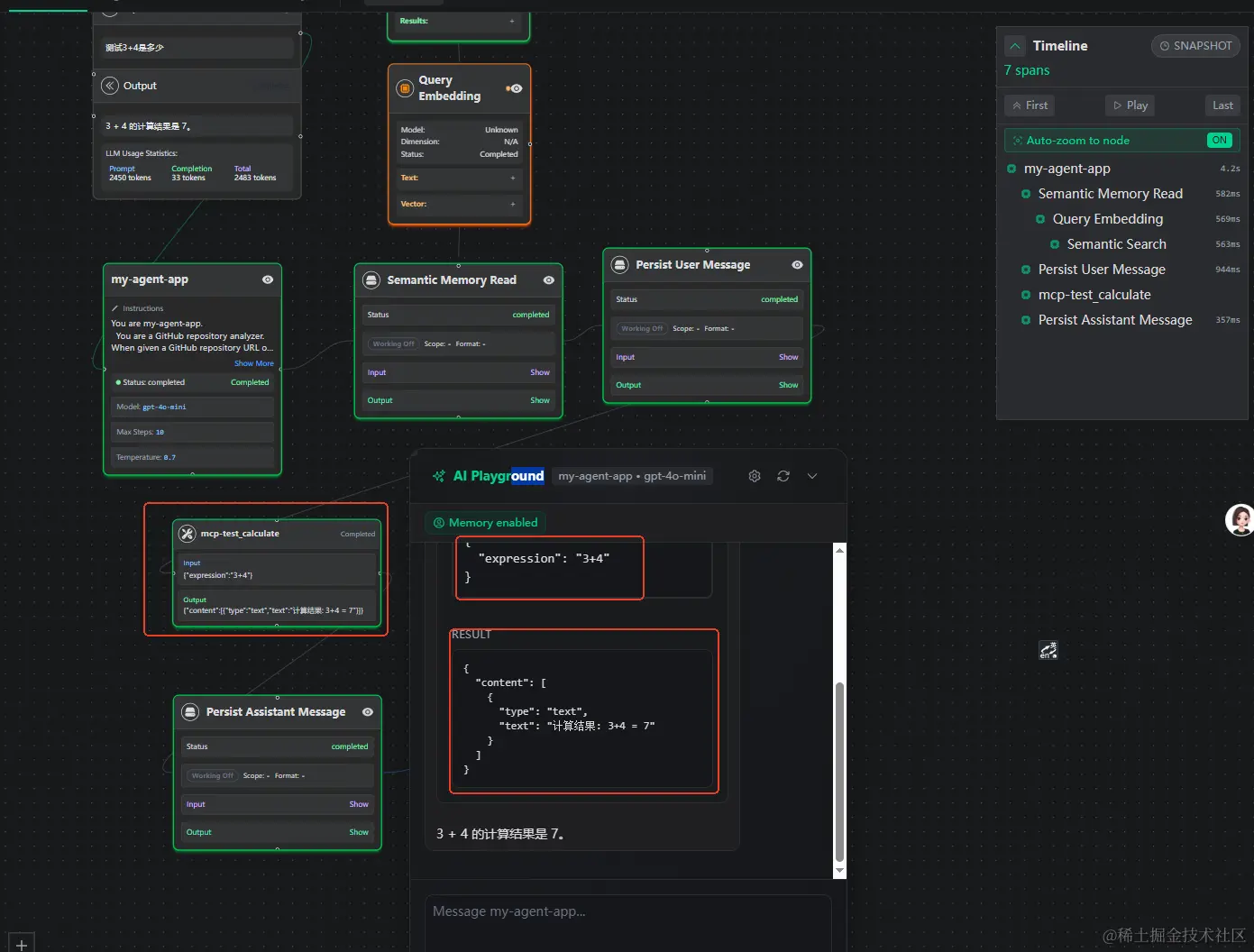
通过Agent 进行测试我们开发的MCP Server可以看到调用了calculate这个工具函数,具体执行步骤示例如下:
通过这篇文章我们可以快速完成 MCP的概念和基础知识的了解,也可以通过实例代码5分钟内完成MCP Server的开发。方便我们在研发后续的场景中尝试提效研发效率: