
山海镜花官方手游
364.08MB · 2025-12-05

在前端风风雨雨的混了多年,从没在项目中实际使用过 IndexedDB 这个浏览器端的数据库,所以今天就摸了下 MDN 的后门,写一个简单的入门示例。
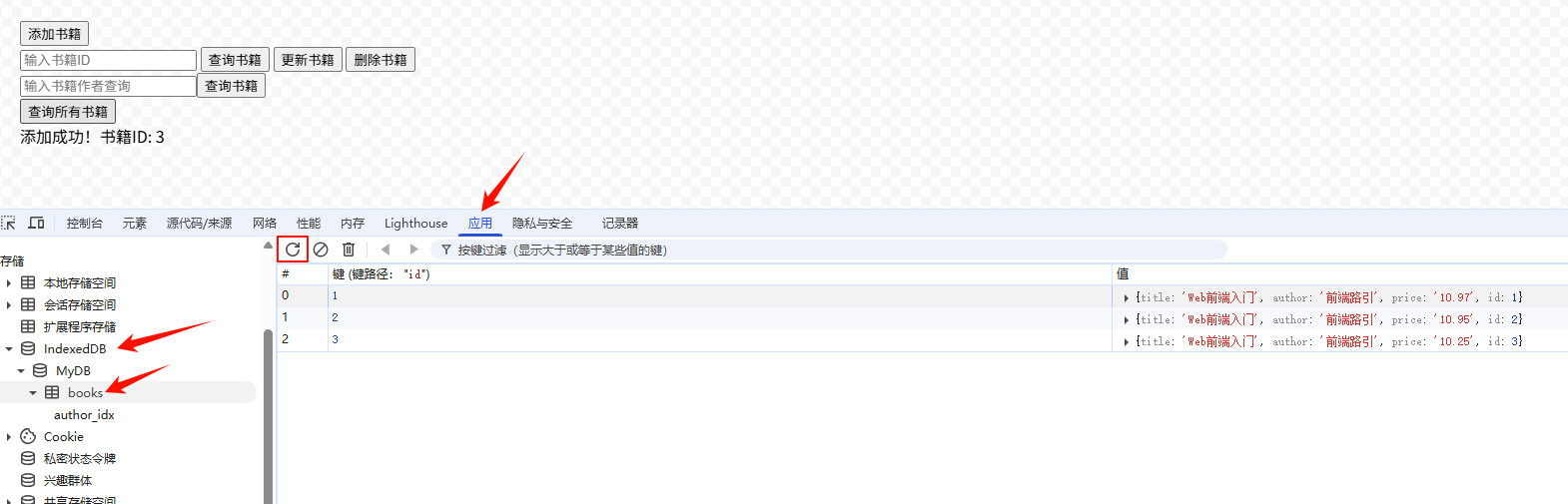
页面大概长这样:
源码:
以下代码包含了一个数据库所有的 CRUD (增删改查)操作。
<div> <button id="js_add_btn">添加书籍</button></div><div> <input type="text" name="" id="js_book_id" placeholder="输入书籍ID"/> <button id="js_get_by_id_btn">查询书籍</button> <button id="js_update_by_id_btn">更新书籍</button> <button id="js_delete_by_id_btn">删除书籍</button></div><div> <input type="text" name="" id="js_book_author" placeholder="输入书籍作者查询"/><button id="js_get_by_author_btn">查询书籍</button></div><div> <button id="js_get_all_btn">查询所有书籍</button></div><div id="output"></div><script> (() => { // 数据库配置 const dbName = 'MyDB'; const storeName = 'books'; const output = document.getElementById('output') let db = null; function setOutputContent(html) { output.innerText = html; } // 初始化数据库 const initDB = () => { const request = indexedDB.open(dbName); // 数据库升级/创建时触发 request.onupgradeneeded = (event) => { db = event.target.result; // 创建对象存储空间(类似数据库表) const store = db.createObjectStore(storeName, { keyPath: 'id', // 主键 autoIncrement: true, // 自动生成ID }); // 创建索引(允许通过作者查询) store.createIndex('author_idx', 'author', { unique: false }); console.log('数据库已创建/升级'); }; // 数据库打开成功 request.onsuccess = (event) => { db = event.target.result; console.log('数据库已打开'); }; // 数据库打开失败 request.onerror = (event) => { console.error('数据库错误:', event.target.error); setOutputContent('数据库错误'); }; }; // 封装包装函数,用于执行数据库相关方法 function wrapper(func) { return new Promise((resolve, reject) => { const transaction = db.transaction([storeName], 'readwrite'); const store = transaction.objectStore(storeName); const res = func(store) res.onsuccess = () => { resolve(res.result) }; res.onerror = (event) => { reject(event.target.error) }; }); } // 添加数据 const addBook = async (book) => { try { const result = await wrapper((store) => store.add(book)) console.log(result); setOutputContent(`添加成功!书籍ID: ${result}`); } catch (error) { console.error(error); setOutputContent('添加失败'); } }; // 通过ID查询数据 const getBook = async (id) => { try { const book = await wrapper((store) => store.get(id)) if (book) { console.log('查询结果:', book); setOutputContent(`书名: ${book.title}n作者: ${book.author}n价格: $${book.price}`); } else { console.log('未找到书籍'); setOutputContent('未找到该书籍'); } } catch (error) { console.error(error); setOutputContent('查询失败'); } }; // 查询全部数据 const getAllBook = async () => { try { const book = await wrapper((store) => store.getAll()) if (book) { console.log('查询结果:', book); setOutputContent(`总数:${book.length}`); } else { console.log('未找到书籍'); setOutputContent('未找到该书籍'); } } catch (error) { console.error(error); setOutputContent('查询失败'); } }; // 更新数据--数据不存在时会添加数据 const updateBook = async (book) => { try { const result = await wrapper((store) => store.put(book)) console.log(result); setOutputContent(`更新成功!结果: ${result}`); } catch (error) { console.error(error); setOutputContent('更新失败'); } }; // 删除数据 const deleteBook = async (id) => { try { const result = await wrapper((store) => store.delete(id)) console.log(result); setOutputContent(`删除成功!结果: ${result}`); } catch (error) { console.error(error); setOutputContent('删除失败'); } }; // 根据作者查询 const getByAuthor = async (author) => { try { const result = await wrapper((store) => { const index = store.index("author_idx"); const request = index.getAll(author); return request; }) console.log(result); setOutputContent(`查询成功!结果: ${JSON.stringify(result)}`); } catch (error) { console.error(error); setOutputContent('查询失败'); } }; // 添加书籍 document.getElementById('js_add_btn').onclick = () => { addBook({ title: 'Web前端入门', author: '前端路引', price: (0.99 * Math.random() + 10) .toFixed(2), }); }; // 根据ID查询 document.getElementById('js_get_by_id_btn').onclick = () => { const bookId = document.getElementById('js_book_id').value; getBook(Number(bookId)); }; // 根据ID删除 document.getElementById('js_delete_by_id_btn').onclick = () => { const bookId = document.getElementById('js_book_id').value; deleteBook(Number(bookId)); }; // 根据ID更新 document.getElementById('js_update_by_id_btn').onclick = () => { const bookId = document.getElementById('js_book_id').value; updateBook({ // 主键ID id: Number(bookId), title: 'Web前端入门', author: '公众号:前端路引', price: (0.99 * Math.random() + 10) .toFixed(2), }); }; // 根据作者查询 document.getElementById('js_get_by_author_btn').onclick = () => { const author = document.getElementById('js_book_author').value getByAuthor(author); }; // 查询全部 document.getElementById('js_get_all_btn').onclick = () => { getAllBook(); }; // 页面加载时初始化数据库 initDB(); })();</script>以下内容为 AI 回答:
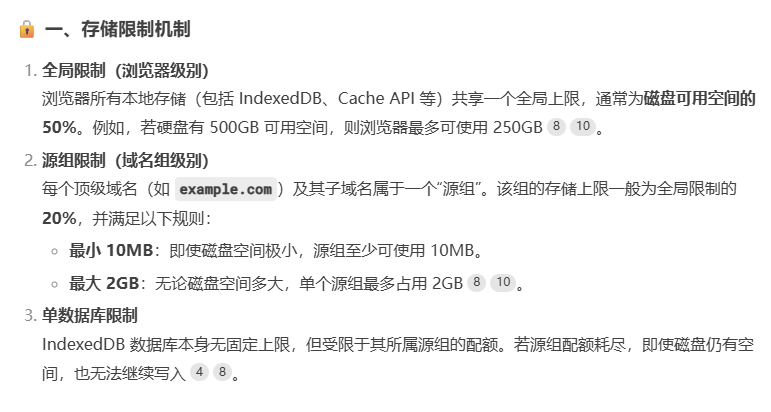
navigator.storage.estimate().then((estimate) => { console.log( `已使用:`, ( (estimate.usage / estimate.quota) * 100 ).toFixed(2) ); console.log(`可使用:`, (estimate.quota / 1024 / 1024).toFixed(2) + "MB");});相关文档:
由于项目中很少使用,所以这 API 给不了太多建议~~
此 API 的应用场景还是有的,可以想想下那些超大文件在线处理应用,比如 ZIP、PSD、PPT 之类的文件,可以将文件解析后存在 IndexedDB 中,在需要的时候查询指定数据即可,这样可以节约很多的解析时间。
只是需要注意,所有存在浏览器端的数据,用户清空缓存之后都将不复存在,所以在使用时需做好容错处理~~
详细文档请参阅 MDN:
一个更加完善的项目:
文章首发于微信公众号【前端路引】,欢迎 微信扫一扫 查看更多文章。

本文来自博客园,作者:,转载请注明原文链接: